ConvertLab360
Performance marketing, measured
Every ad channel.
One revenue dashboard.
One dashboard instead of five ad accounts. No manual exports, no copy-paste reports.
No sign-up. Opens a demo workspace with real sample data.
Connects to your stack
Instead of five accounts and manual reports
Before
- ✕Google Ads, Meta, TikTok, LinkedIn — each separate
- ✕GA4 doesn't match platform attribution
- ✕Clarity shows friction but not linked to revenue
- ✕Reports assembled manually
- ✕Unclear what actually changed today
After
- One dashboard: spend, revenue, ROAS across all channels
- GA4 last-click next to platform spend
- Clarity friction next to revenue-critical pages
- Daily auto-sync — reports build themselves
- Daily verdict on what moved and whether it matters
Who it's for
Built for teams running ads across multiple channels
Performance teams
See spend, ROAS and conversions across every channel in one place — stop switching between five ad accounts.
Agencies
Prepare client reports fast and keep each client's data fully isolated with multi-tenant workspaces.
Founders / CMOs
See at a glance whether revenue is growing faster than ad spend — without asking the team for a custom report.
Analysts / CRO
Combine GA4 attribution with Clarity friction on one screen — understand why conversion rates drop.
See it in action
The real dashboard, real data
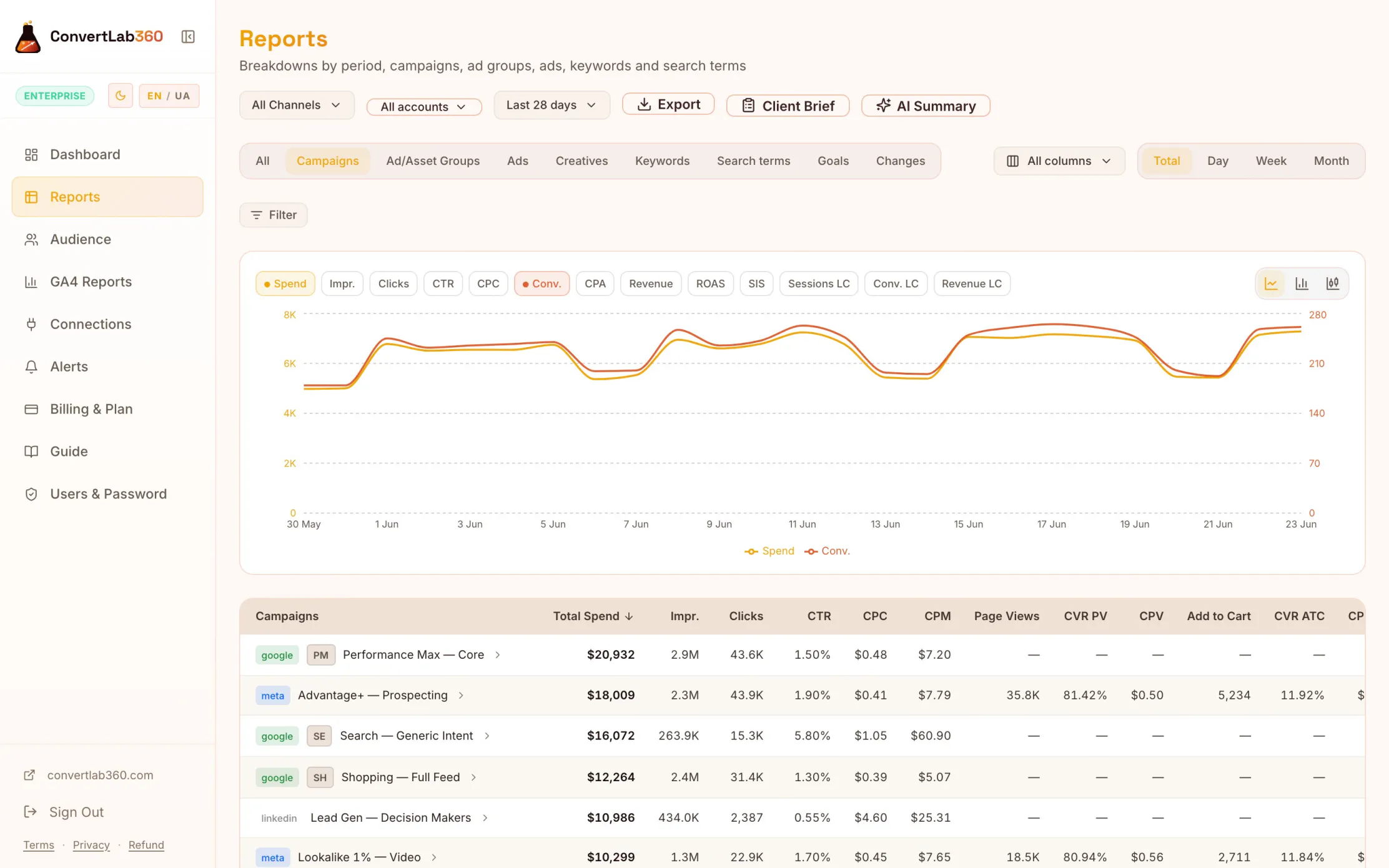
Campaign performance, every channel
Find campaigns with high spend and low ROAS — before the budget loss compounds. Filter by channel, campaign, ad group or keyword with AND/OR rules. One-click export to CSV, Excel or Google Sheets — filters and drill-down included.
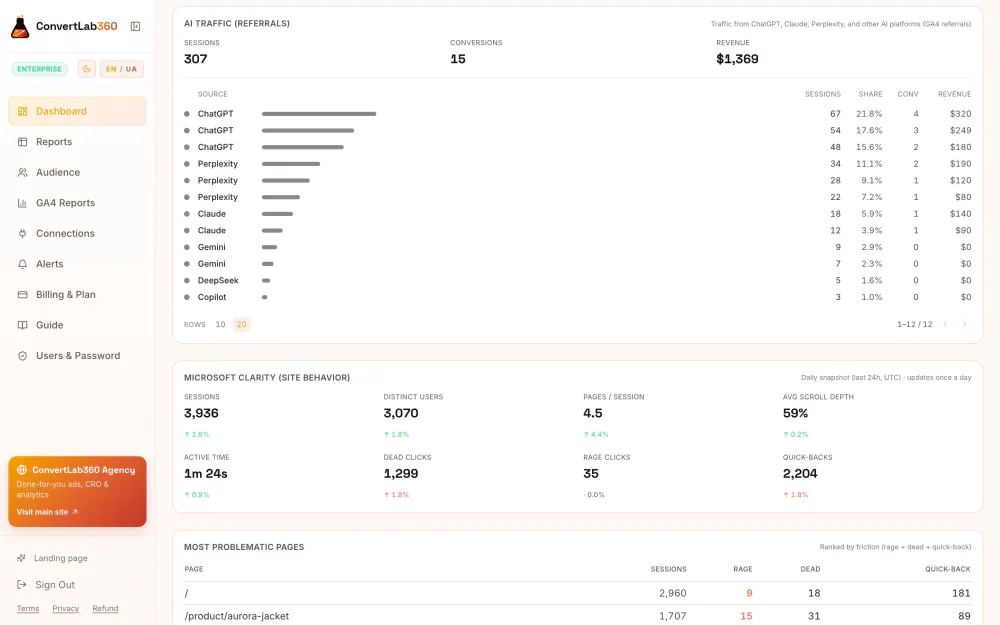
AI traffic + on-site friction
Find rage clicks on revenue-critical pages — the "why" GA4 alone can't explain. Sessions from ChatGPT, Perplexity and Claude alongside Clarity data.
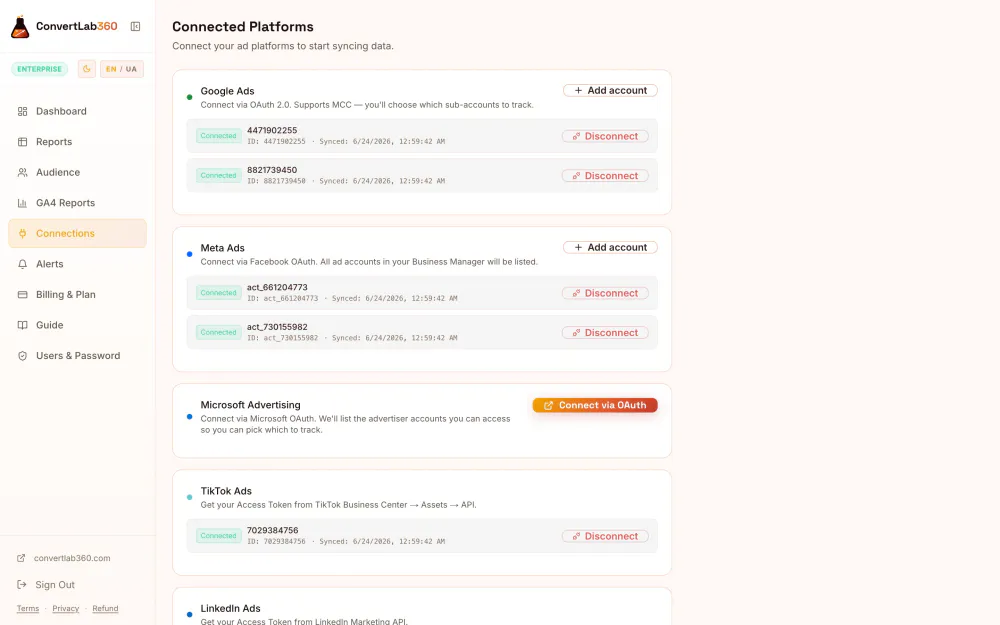
Connect once, sync forever
Connect every platform once through your own OAuth apps — so the data stays yours. Daily sync, no manual exports.
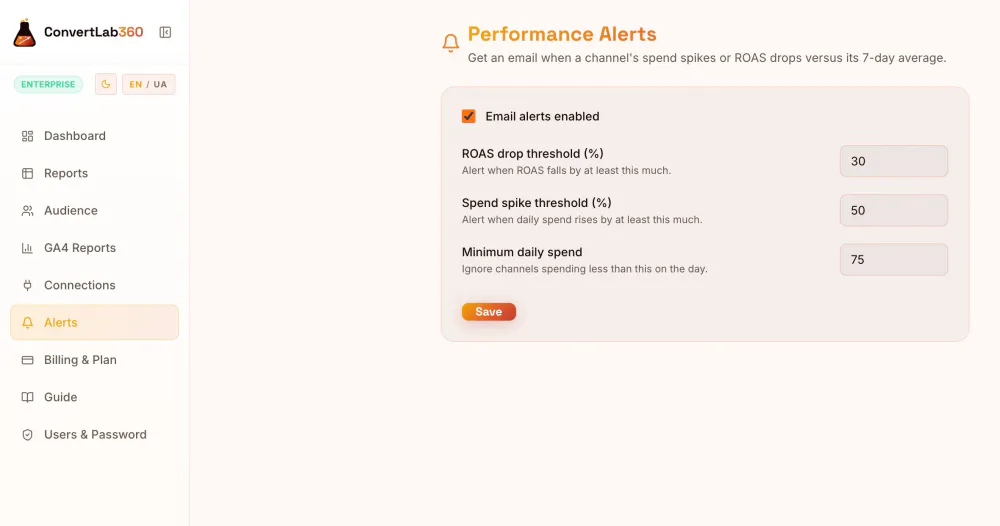
Alerts + change verdicts
Get notified before a ROAS drop becomes expensive. Email when spend spikes or ROAS falls vs the 7-day average, plus a daily verdict on what actually moved.
What's inside
Everything the dashboard does
Manage budget
Unified dashboard
Every channel in one view with period-over-period comparison and direction-aware deltas — green when it's genuinely good, red when it isn't.
Alerts
Get notified when spend, ROAS or conversions cross the thresholds you set.
Audience & competition
Demographics, new-vs-returning and landing pages, plus impression share and budget-lost signals.
Explain results
Any date range, deep history
Custom from/to ranges and history reaching back years — not just the last 30 days.
True attribution
GA4 last-click sessions, conversions and revenue merged onto ad spend at campaign and ad-group level.
Daily change verdicts
A daily digest that restates attribution, flags critical movers and tells you what changed and whether it matters.
Find site friction
On-site friction (Clarity)
Rage clicks, dead clicks, quick-backs and your most problematic pages — the "why" GA4 can't show.
Report to clients
Reports & exports
One-click export of any table to CSV, Excel or Google Sheets — the full filtered result, not just the visible page. Your drill-down and AND/OR filters are baked in, and numbers stay summable, so it drops straight into client reports.
Agency-ready
Multi-tenant with per-client data isolation and an agency admin view.
How it works
From accounts to answers in three steps
1 · Connect
Link your ad accounts and GA4 via OAuth and add a Clarity key. One-time setup through your own apps.
2 · Sync
We pull your history and refresh every day — no manual exports, no copy-paste.
3 · Decide
Open the dashboard, read the daily verdict and act on what actually moved — not on gut feeling.
What happens after the demo
Four steps to your own workspace
Explore the demo workspace — no sign-up, open immediately.
Create your workspace or sign in to an existing one.
Connect your accounts once via OAuth.
Get daily verdicts and alerts — no manual reports.
Security & trust
Your ad accounts, your data
- Data stays in your own OAuth apps — we never store raw credentials
- Read-only access where possible
- Per-client data isolation for agencies
- Built by the ConvertLab360 performance team
OAuth — no raw credentials stored
Read-only access where possible
Per-client data isolation for agencies
Pricing
Simple plans. No lock-in.
Free
$0 forever
- 2 ad channels
- 30 days of history
- Data refresh every 6 hours
- Full dashboard & insights
Pro
Popular$29 /month · annual = 2 months free
- 5 channels, 1-year history
- 15-minute data refresh
- AI reports, exports (CSV/Sheets)
- AI Visibility lite — is AI citing your brand?
- 5 team members
- Card (Creem) or Monobank ₴
Enterprise
$99 /month · annual = 2 months free
- Unlimited channels & history
- AI Visibility full — 30 prompts, every AI engine, brand mentions, SoV alerts
- Real-time data & WebSocket updates
- Unlimited team members
- Priority support
14-day trial with Pro features on every signup. No card required.
For agencies
Manage many clients? Never pay per client.
Most reporting stacks charge per data source, per seat and per connector — then you still buy a separate BI tool to see anything, and the bill balloons as you grow. We don't work like that.
- Cross-client triage: who needs attention across your whole book
- Own-book benchmarks: rank each client against your book
- Bulk white-label reports across every client
- Your own white-label domain (reports.youragency.com)
- Full AI Visibility & AI reports per client
- Each client fully isolated in their own workspace
Tell us how many clients you run and what you need — SSO and data residency included. We will come back with a scope and a price.
FAQ
Common questions
How does my data get into the dashboard?+
You connect each ad platform once via OAuth (Google, Meta, Microsoft) or an API key (TikTok, LinkedIn). Data syncs automatically on a schedule — no manual exports.
Can ConvertLab360 change anything in my ad accounts?+
No. Access is read-only: we pull metrics and account structure, and never touch campaigns, budgets or bids.
Is there really a free plan?+
Yes — 2 channels, 30 days of history and the full dashboard, no card required. The 14-day trial adds Pro features on top; when it ends you simply continue on Free.
How fresh is the data?+
Pro syncs every 15 minutes, Free every 6 hours. Every page shows the exact time of the last sync.
How do payments work?+
Card via Creem (USD) or Monobank (UAH). Month-to-month, no lock-in; the annual option equals 10 monthly payments (2 months free). If a period ends, you keep access for a 7-day grace window and then move to Free — your data stays.
Do you charge per client?+
No — we never meter clients, data sources or seats. Each client gets their own isolated workspace, and you get cross-client triage and own-book benchmarks on top. Running a book of clients is a scoped conversation rather than a self-serve plan: tell us the size and we come back with a price.
Is my data safe?+
OAuth tokens are encrypted at rest (AES-256), tenants are isolated at the database level (PostgreSQL RLS), and agency clients never see each other's data.
Try it now
Open the demo workspace and check 4 scenarios in 2 minutes
No account required — or sign in to your workspace.
- Find campaigns with budget loss
- Compare spend and revenue across channels
- See GA4 attribution vs platform data
- Find friction pages in Clarity